RED interchange API in combination with RED medical can be used to support a complete asynchronous prescription creation workflow including
- definition of patient medication by a 3rd-party system (e.g. definition of formulations or compositions) and transfer to RED medical for electronic signature
- electronic signature of all collected prescriptions by a physician in RED medical frontend and transfer to Fachdienst
- request of signed prescriptions task ids by 3rd-party system
Transfer of medication requests to RED
Medication requests may be transferred to RED at any time using the regular medication createerptask request → RED interchange API - Create Data Medication
{{baseURL}}/{{tenant}}/TI?action=$createerptask
- The ID used in the MedicationRequesrt Bundle Item will be returned used to identify the original request
- The Practitioner Item is not required as the signing physician may not be known at this stage
Sign medication requests in RED medical
At any point in time users may log in to RED medical to see all medication requests that have not yet been signed and sent. With one click the user is able to execute a batch process that signs and sends all pending prescriptions using comfort signature features such as Komfortsignator and Stapelsignatur.
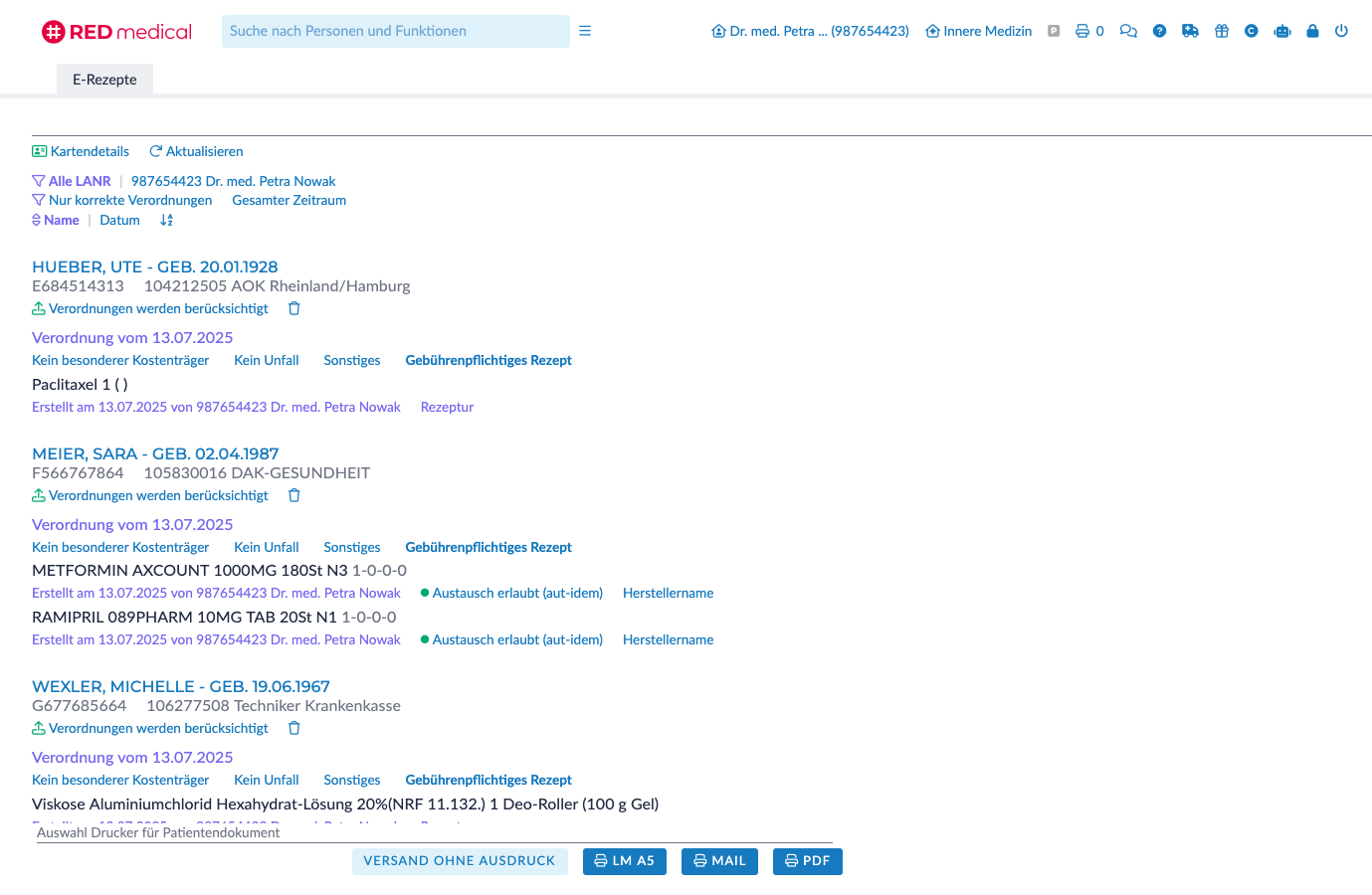
Request for signed prescriptions
Once the signatures have sucessfully been sent to and stored in the central e-prescription service (E-Rezept-Fachdienst) the prescription identifiers (Task-ID and AccessCode) are safely stored in RED. At any time they may be requested by the 3rd-party system that initiated the prescriptions using a GET request for tasks
{{baseURL}}/{{tenant}}/Task?from=202507070808&to=202507070829&page=1
- to limit the result parameters from and to can be used. They specify a datetime in YYYYMMDDHHmm-format
- all results will be paginated with a maximum of 10 task items per page. The parameter page allows to navigate in the results
- The identifier Bundle.entry.Task.id corresponds with the ID of the initial MedicationRequest.
- PrescriptionID and AccessCode are required to fetch the full prescription bundle (see RED interchange API - E-Prescription / Pharmacy / Get Task)
<Bundle>
    <id value="ID"/>
    <type value="searchset"/>
    <entry>
        <Task>
            <id value="ooKRR2vOFy2nGKX2l_5qFejS0kAei6Gt"/>
            <identifier>
                <use value="official"/>
                <system value="https://gematik.de/fhir/erp/NamingSystem/GEM_ERP_NS_PrescriptionId"/>
                <value value="160.000.248.525.571.70"/>
            </identifier>
            <identifier>
                <use value="official"/>
                <system value="https://gematik.de/fhir/erp/NamingSystem/GEM_ERP_NS_AccessCode"/>
                <value value="80d27ec4f6e1ab209312ee7e5aa0b087755da71b7f56e06457aa07ad1172b6e0"/>
            </identifier>
            <authoredOn value="2025-07-07"/>
            <status value="in-progress"/>
        </Task>
    </entry>
    <entry>
        <Task>
            <id value="1tR57bavonLCM6/dBuRkcgv7Fg1Yo5Vn"/>
            <identifier>
                <use value="official"/>
                <system value="https://gematik.de/fhir/erp/NamingSystem/GEM_ERP_NS_PrescriptionId"/>
                <value value="160.000.248.525.572.67"/>
            </identifier>
            <identifier>
                <use value="official"/>
                <system value="https://gematik.de/fhir/erp/NamingSystem/GEM_ERP_NS_AccessCode"/>
                <value value="5f848ce2c95915f802352230ef5259053dedb66e7cf1d992dcd296da6cb7a955"/>
            </identifier>
            <authoredOn value="2025-07-07"/>
            <status value="in-progress"/>
        </Task>
    </entry>
</Bundle>
